Documentation
Use this runbook for the copy, run, configure, and first-result sequence. Package behavior and runtime compatibility should be verified in the environment where your agent operates.
Jump to commandThis page is an operational handoff, not a sales form. Review the package identity, execute the exact command in a trusted terminal, configure secrets outside prompts, and begin with a small research task whose output a person can inspect.
Use this runbook for the copy, run, configure, and first-result sequence. Package behavior and runtime compatibility should be verified in the environment where your agent operates.
Jump to commandBefore executing third-party code, inspect package metadata and permissions. Keep API keys in an approved secret store, limit access to the minimum required, and document network destinations.
Read privacy notesInstallation is self-directed and asynchronous. Runtime errors, provider quotas, credentials, and account permissions are environment-specific; retain terminal output without exposing secrets when troubleshooting.
Review field notes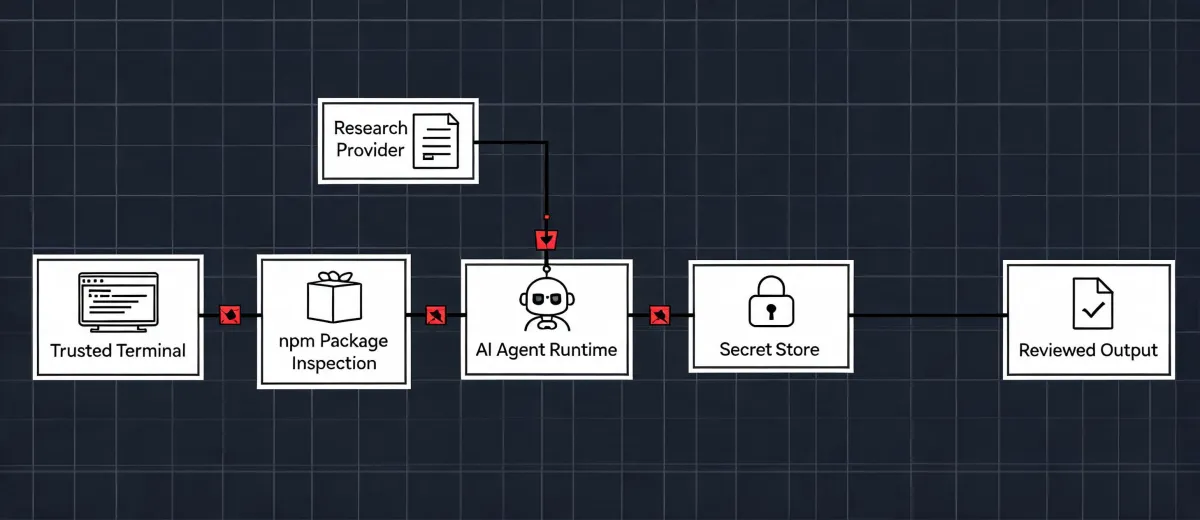
The installer should be treated as executable software. Confirm what it downloads, what files it creates, which runtime it targets, and what outbound connections it makes. Configuration belongs in environment-level secret management rather than conversational context.
For updates, inspect the new package version before running the same installer again. For removal, follow the generated runtime's package or skill removal procedure and separately revoke provider credentials. Deleting a local skill does not automatically revoke an external API key or erase provider-side records.
Use the button to copy only the command. A successful copy means the text is on your clipboard; nothing has been installed.
Open a trusted terminal, confirm the working environment, review npm's execution prompt, and run the command.
Add required provider credentials through your runtime's secret mechanism. Apply least privilege and never commit them to source control.
Request a bounded company set, require provenance notes and unknown states, then review every record before export or outreach.
npx -y @okki-global/okki-go-taroball